Your whole PrestaShop shop, on your computer. No waiting.

One Shop Manager is a Mac and Windows app that syncs your shop to your computer. Catalog, orders, picking, promotions, customers: everything opens, filters and sorts instantly, then can be edited in bulk like in a spreadsheet. No more waiting for back office pages.

A 14-day trial that starts with the first sync of your shop: every feature, no account, no credit card. After that, one license, paid once.

Watch the video 1 min One-time payment Mac + Windows 0 external servers
Price +10% 7 rows selected
ReferenceNamePrice excl. VATStock
1BG-200Soy wax candle 200 g14.19148
2BG-450Soy wax candle 450 g26.9562
3ME-01Wooden wicks, pack of 108.80310
4CF-XLDiscovery gift set, 6 scents163.909
5DF-VANBourbon vanilla diffuser43.8927
6RC-PKFragrance refill 50 ml5.72540
7SU-ANNBrass ring holder79.2014
8BG-900Soy wax candle 900 g44.0021
9ET-KRKraft labels, roll3.401,200

Catalog · 48,213 products

One Shop Manager in 1 minute

Filter 48,000 products. Stopwatch running.

The PrestaShop back office
your-shop.com/admin/catalog

Loading page… 0.0 s

Every filter, every sort, every page: a round trip to the server.

One Shop Manager
Catalog — 48,213 products
filter: stock < 5 and active

312 products · 0.0 s

The data is on your disk. The server is only called to write.

A typical day, before and after

Time spent in the back office versus time in One Shop Manager, on a shop with 5,000 products.

Change the price of 500 products
2 h
1 min
Paste 80 tracking numbers and set the orders to "Shipped"
45 min
2 min
Create 120 size × color combinations
1 h 30 min
5 min
Find active products with no stock or no image
30 min
3 s
Launch a −20% promotion on a category, with dates
30 min
2 min
Print 40 delivery slips
20 min
1 min
Total for the day
5 h 35 minin the back office
11 minin One Shop Manager

More than 5 hours given back, every day these tasks come around.

Durations estimated on our test shops; your own figures will differ: the back office varies with hosting and the number of modules.

One price, once

You buy the license, it is yours. No subscription, no billing by number of products. Updates after the first year are optional.

Zero waiting, hours given back

The data is on your disk: 50,000 products filter in the blink of an eye. What takes an afternoon in the back office becomes one operation: select, preview, run, undo if needed.

The whole shop, not just the catalog

Products, combinations, categories, orders, picking, the till for your store, promotions, customers, imports and reports in a single app, on your Mac or PC. It talks directly to your PrestaShop, with no external server.

The whole shop, without waiting for the back office

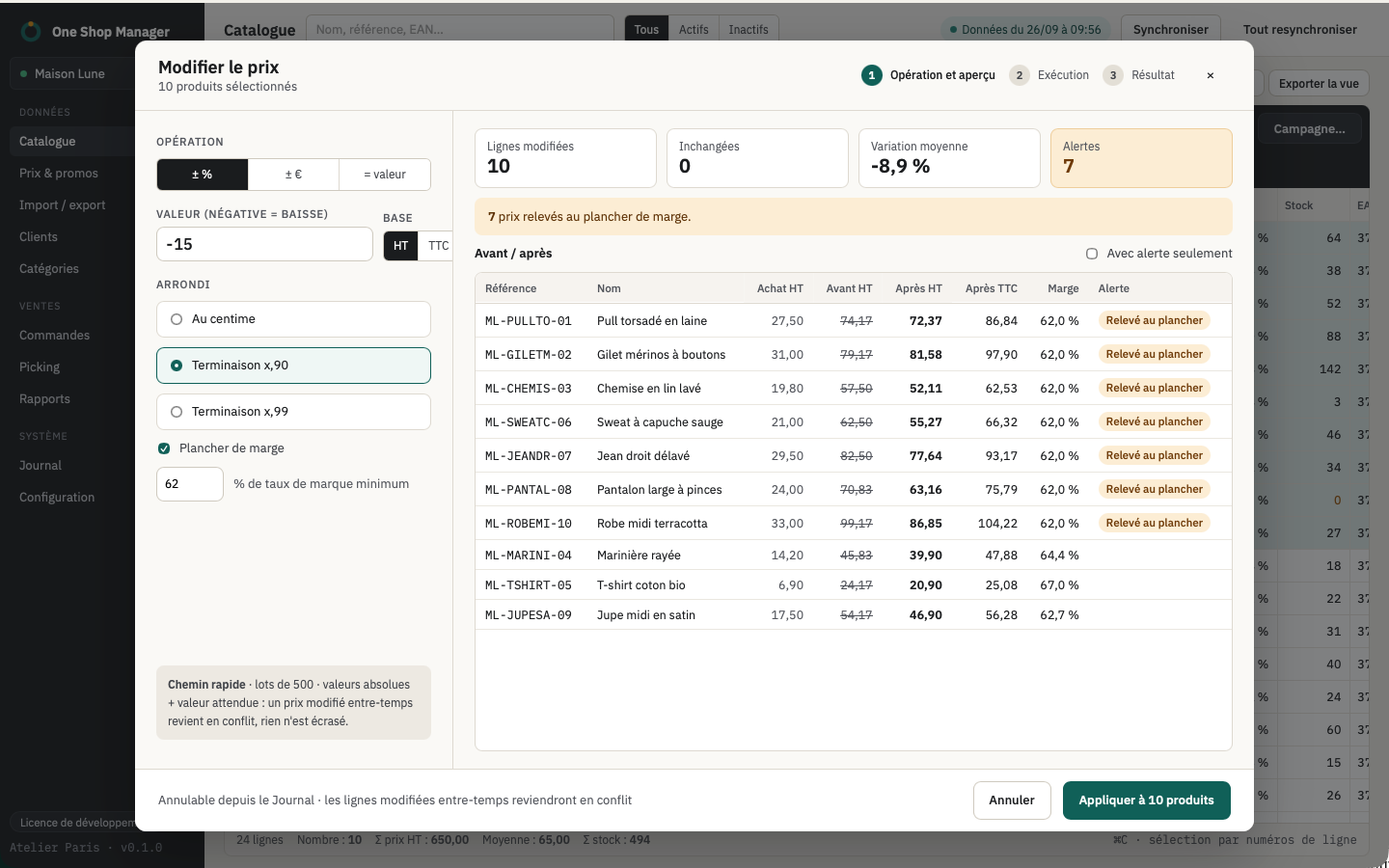
Bulk operations, with a preview before anything is written

Prices by percentage or by amount, excl. or incl. VAT, rounding to .99, margin floor. Stock set or adjusted. Enable, disable, change categories, set any field.

  • Row-by-row preview with warnings: negative price, duplicate EAN, change greater than 50%
  • Runs in batches, with visible progress, and conflicts detected if the shop changed in the meantime
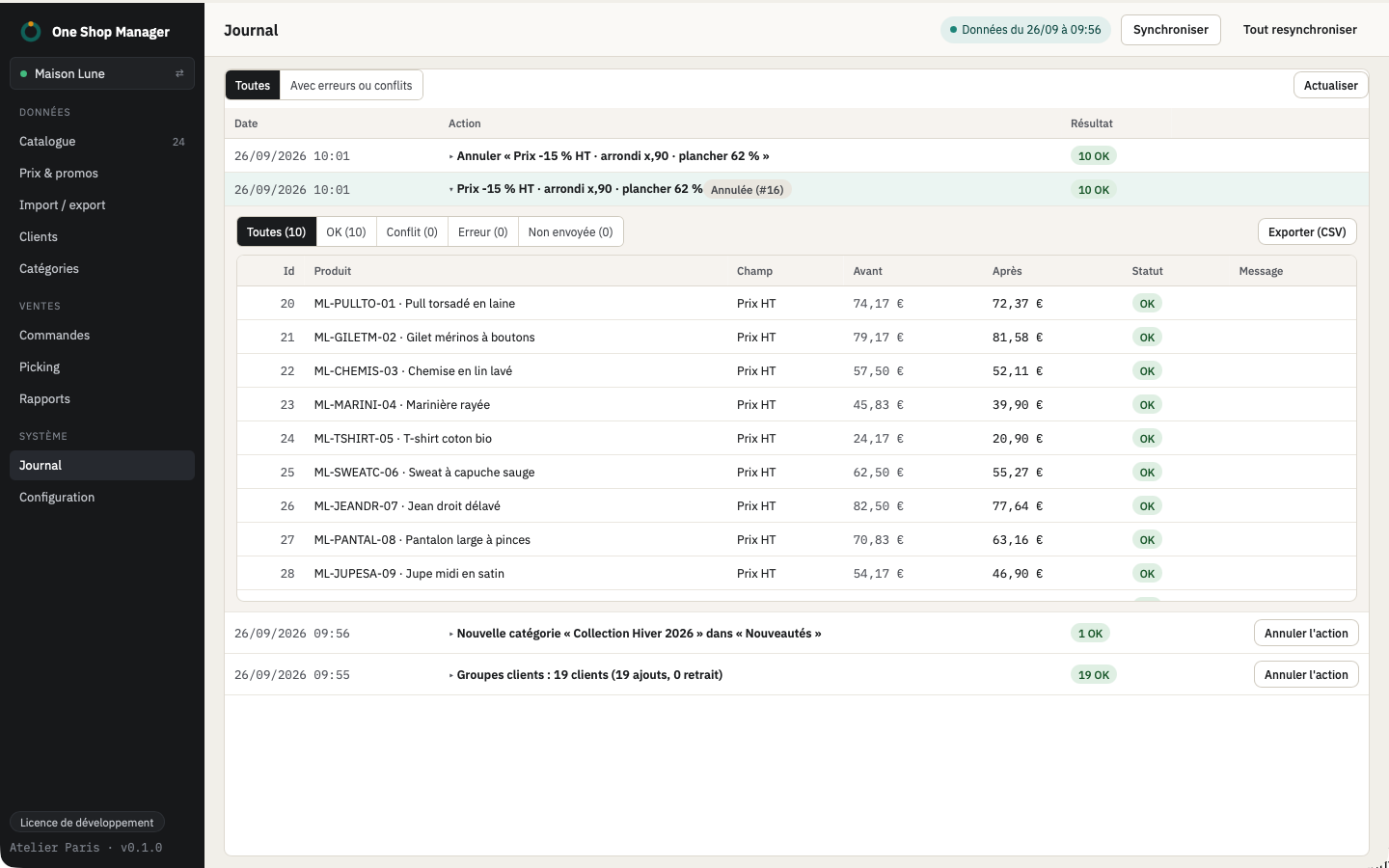
  • Log of actions to retry errors or undo an operation

All bulk operations

Change the price of 1,240 products
Bulk price change
New

A till (POS) for your store, on the website's stock

Switch to till mode: items are scanned with a barcode scanner or tapped on screen, the total is calculated by the shop, and every payment creates a real PrestaShop order. The website and the counter sell from the same stock.

  • Discounts per line or on the cart, walk-in customer or shop customer, multiple payments and change given
  • Receipt printed or sent by email, invoice on request, duplicates and cancellations tracked
  • Tamper-proof till journal: chained and signed entries, perpetual grand total, automatic closings, signed archives

The till in detail

Till — Sale
Till mode: counter sale
New

Your AI assistant plugged into the shop, without touching production

Turn on AI access from the AI access menu: your assistant (Claude, Cursor or any MCP-compatible client) reads the shop data already on your computer: catalog, stock, orders, customers, reports. It answers without calling the server.

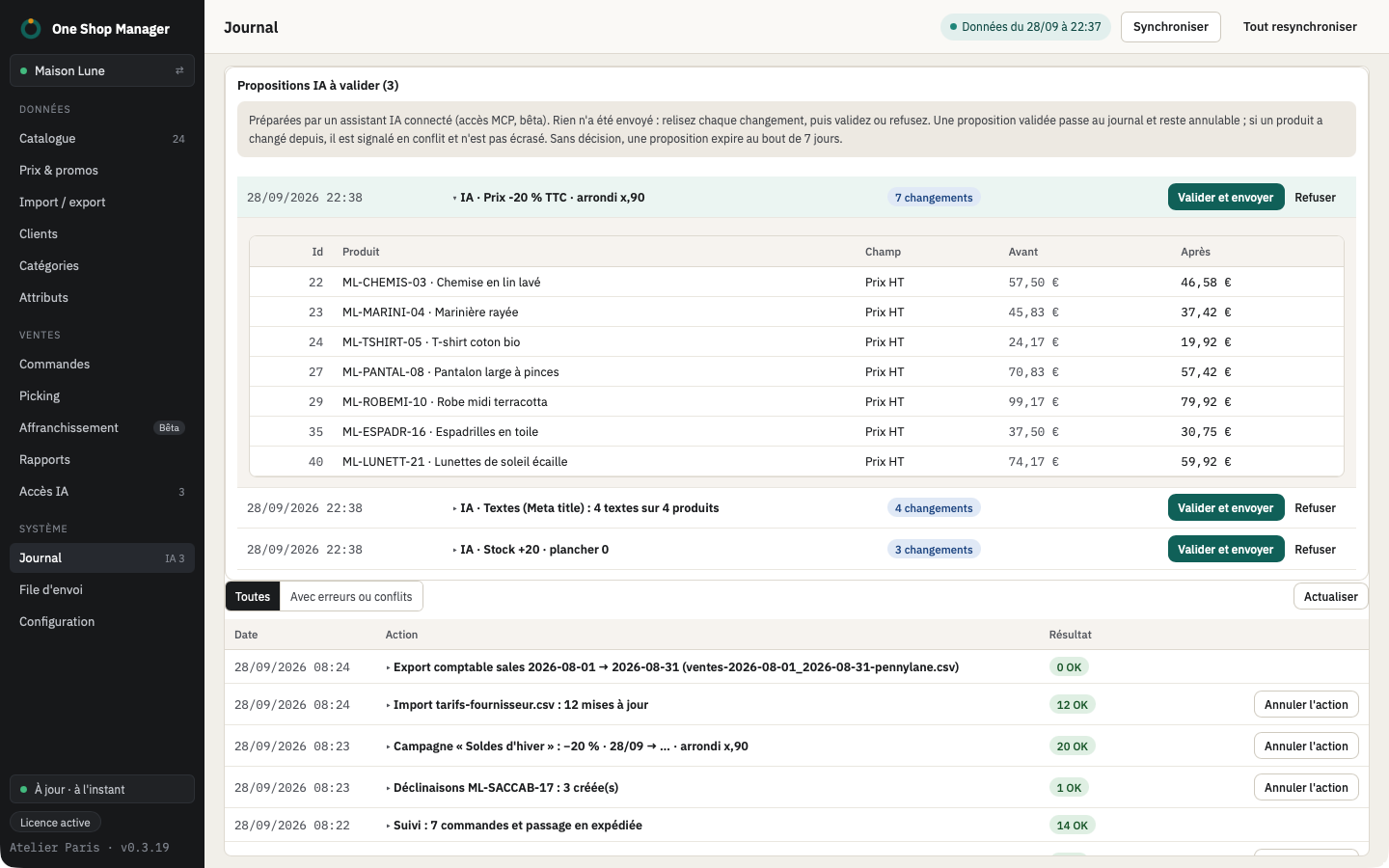
  • The AI never modifies the shop: it submits proposals for prices, stock, status, categories or texts
  • Each proposal opens in the usual preview, with before/after and warnings: you apply, adjust or reject
  • Access limited to your computer, protected by a token, off by default; everything goes through the log and can be undone

The AI assistant in detail

AI assistant — pending proposals
AI assistant proposals to approve

A grid that behaves like your spreadsheet

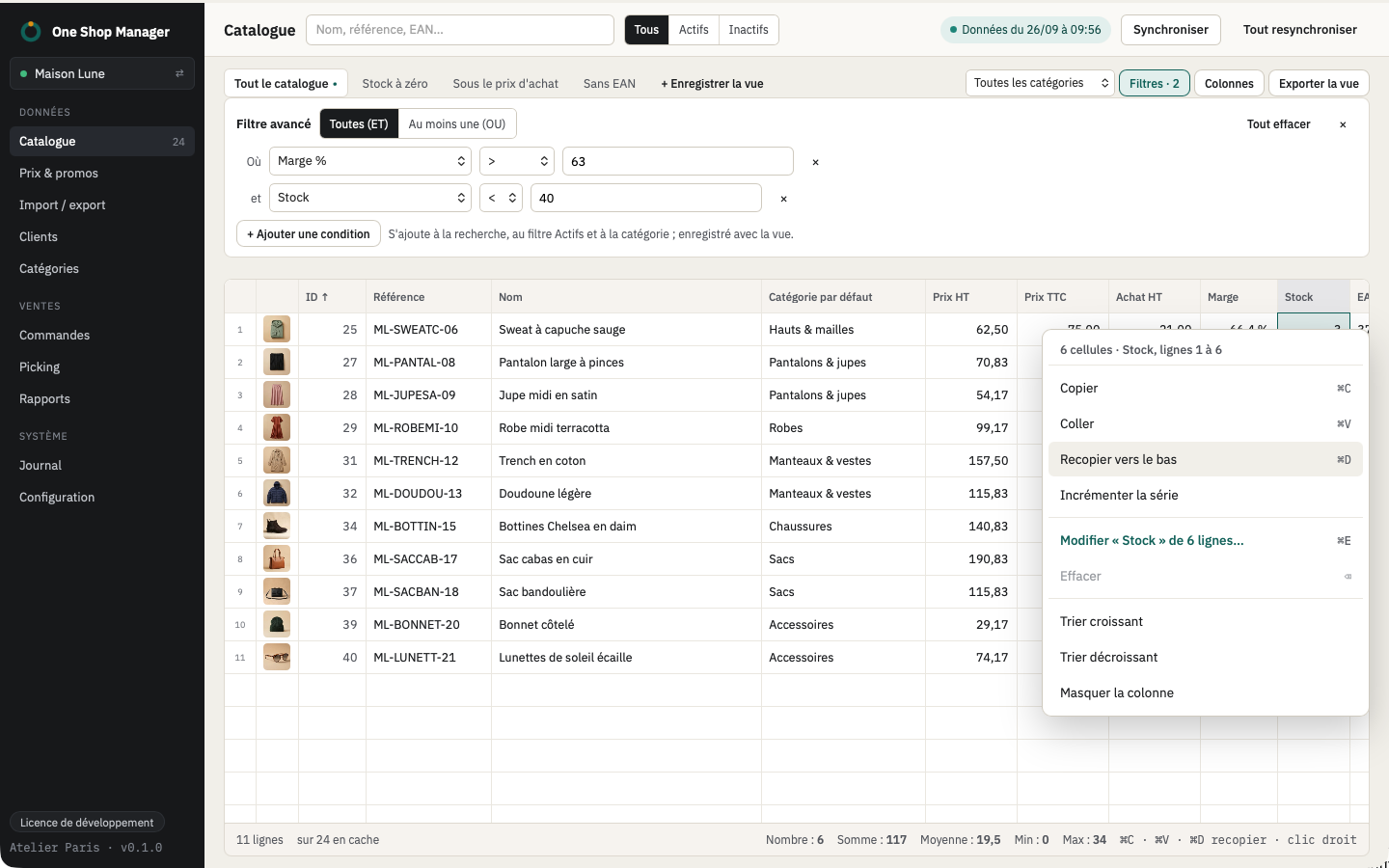
Copy and paste from Excel, fill down, range selection, paste a list of references, advanced filters, saved views, instant sorting on 50,000 products.

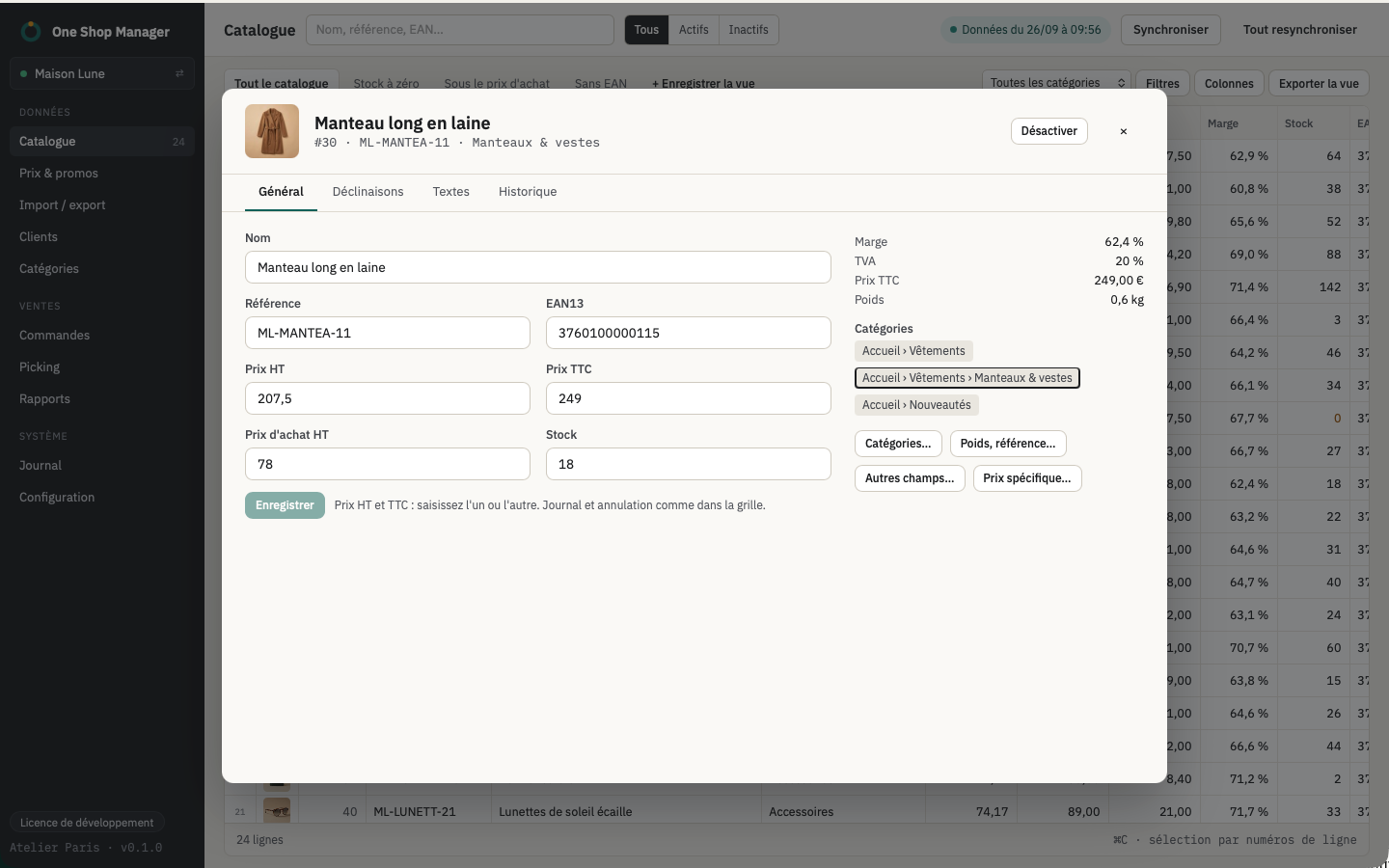
  • Full product page and category page
  • Multilingual texts and SEO: find/replace, templates such as {name} - {manufacturer}
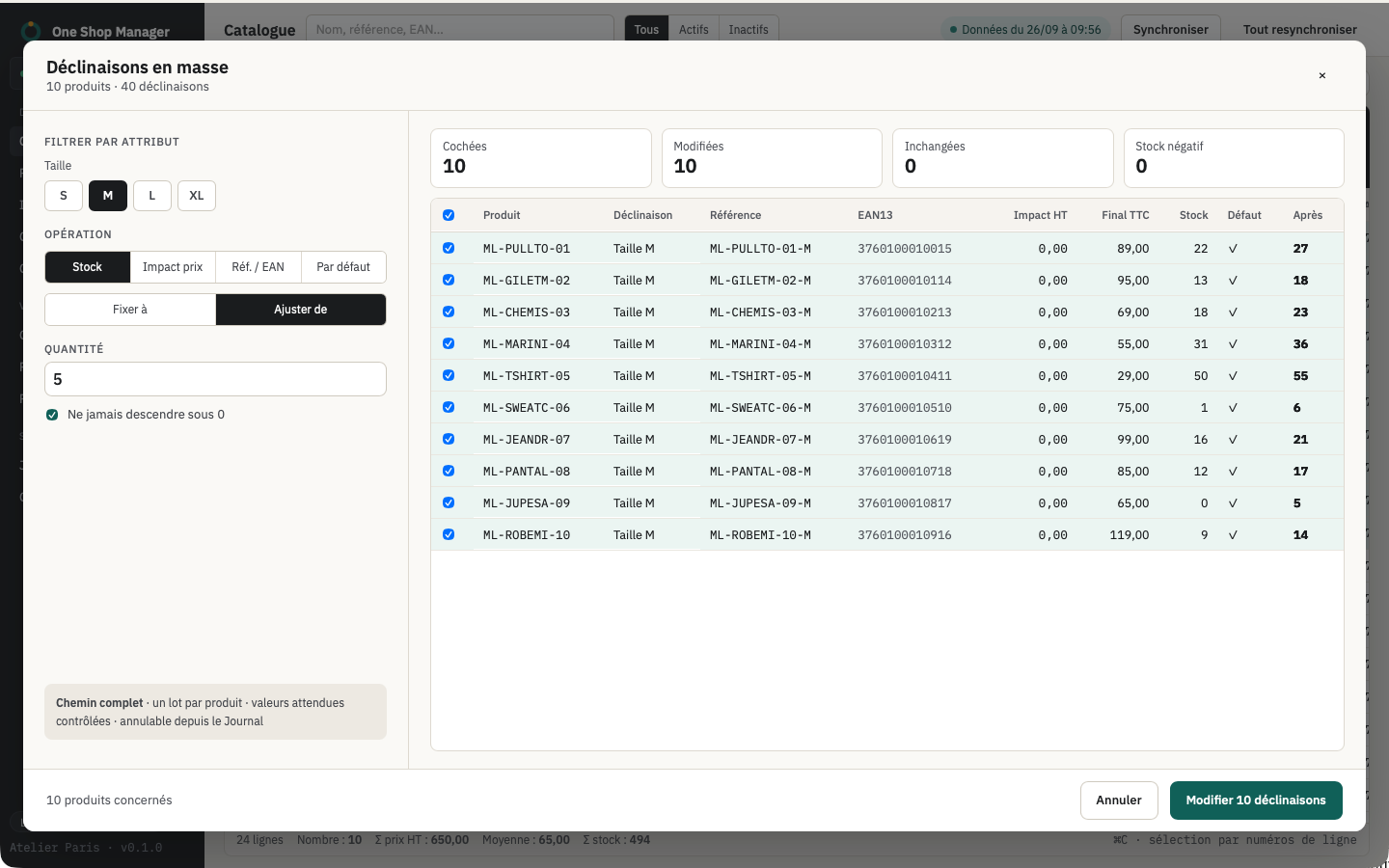
  • Combinations generated as a Cartesian product, references and EANs from a template

The grid and combinations

Catalog
Catalog grid

Orders and picking

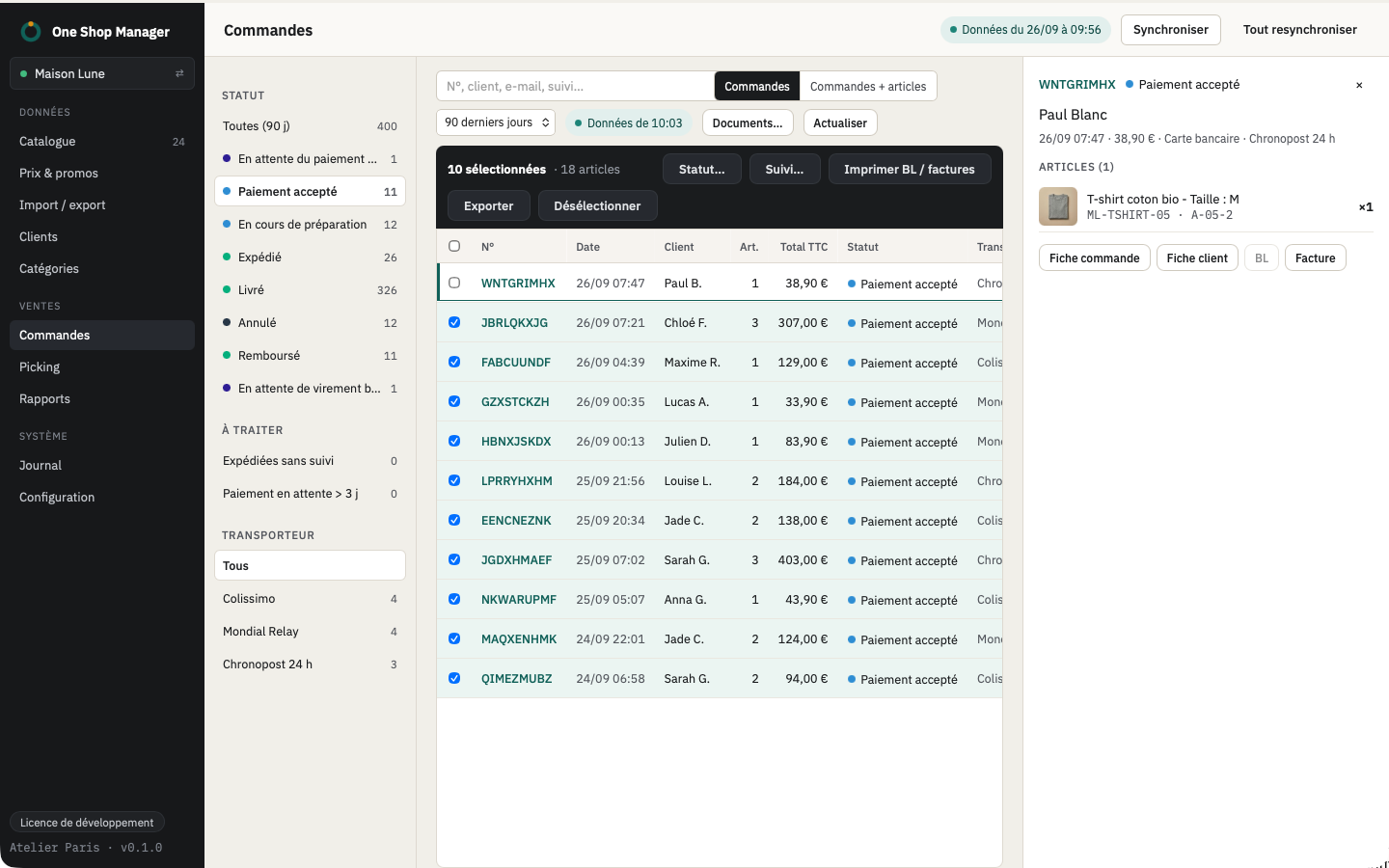
"To handle" filter, status change on several orders at once, tracking numbers pasted in bulk, delivery slips, invoices and credit slips printed in batches.

  • Picking mode: picking list, barcode scanner, locks between pickers
  • Order page and customer page without leaving the grid
  • Picking progress visible in the list

Orders and picking in detail

Orders — To handle
Orders and picking

Promotions and promo codes

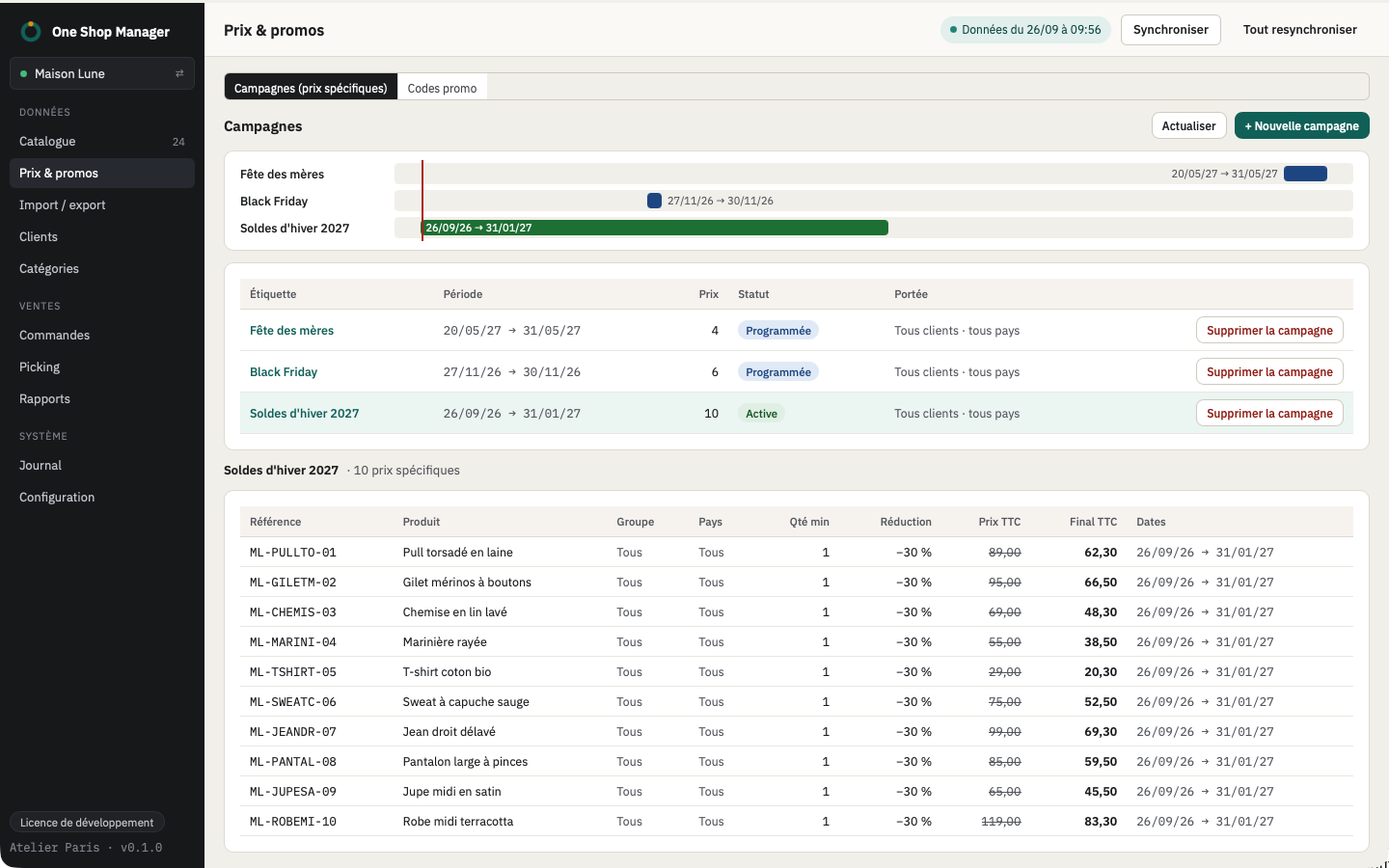
Specific price campaigns grouped by label: discount, dates, group, country, minimum quantity, floor at the purchase price. A campaign is removed in one click.

  • Warning when two campaigns overlap
  • Promo codes in a list, purge of expired codes that were never used

Prices and specific prices in bulk

Promotions
Promotions and campaigns

Import, export, reports

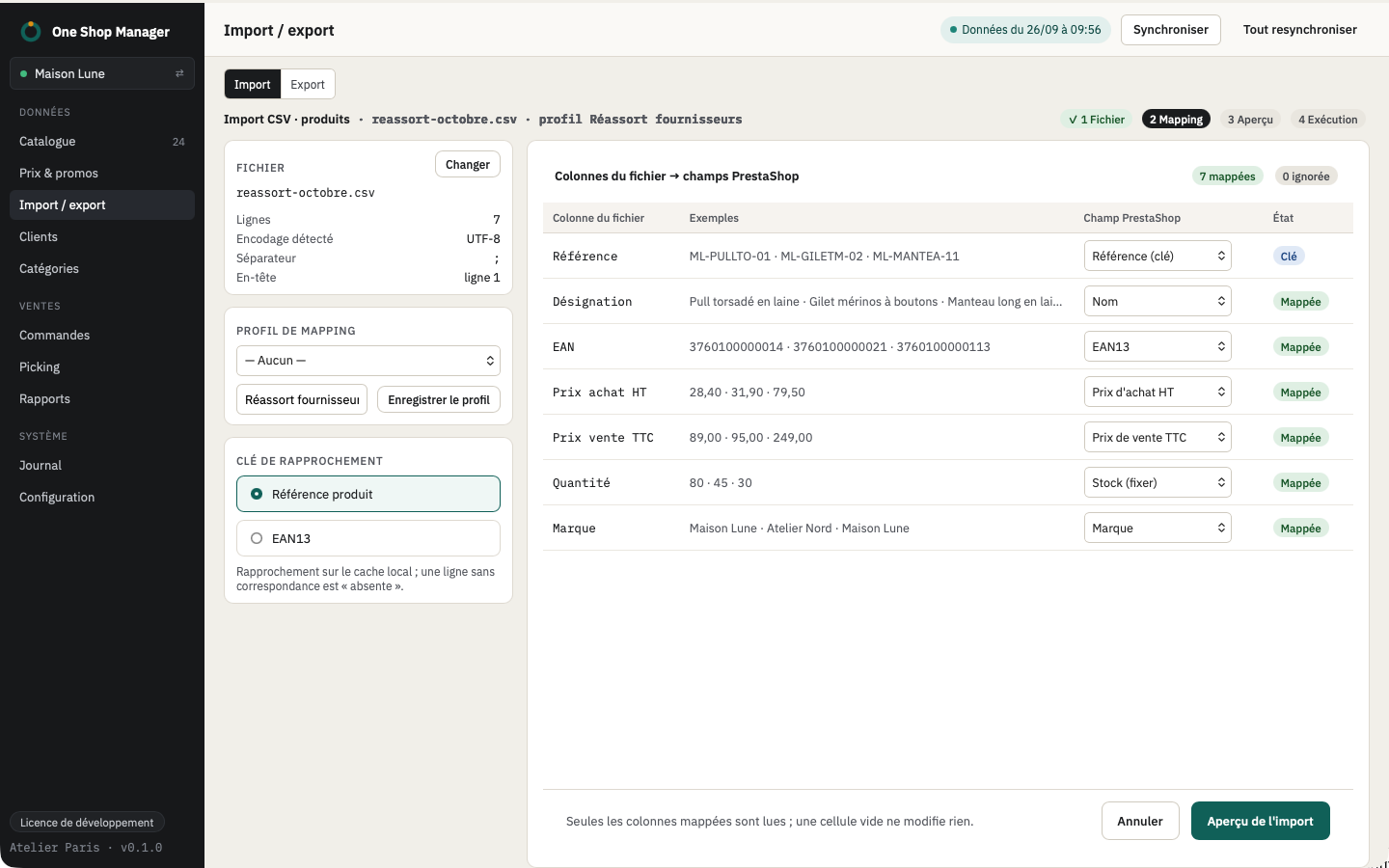
CSV or XLSX import with mapping profiles, matching by reference or EAN, creation of missing products. Export of what you see on screen.

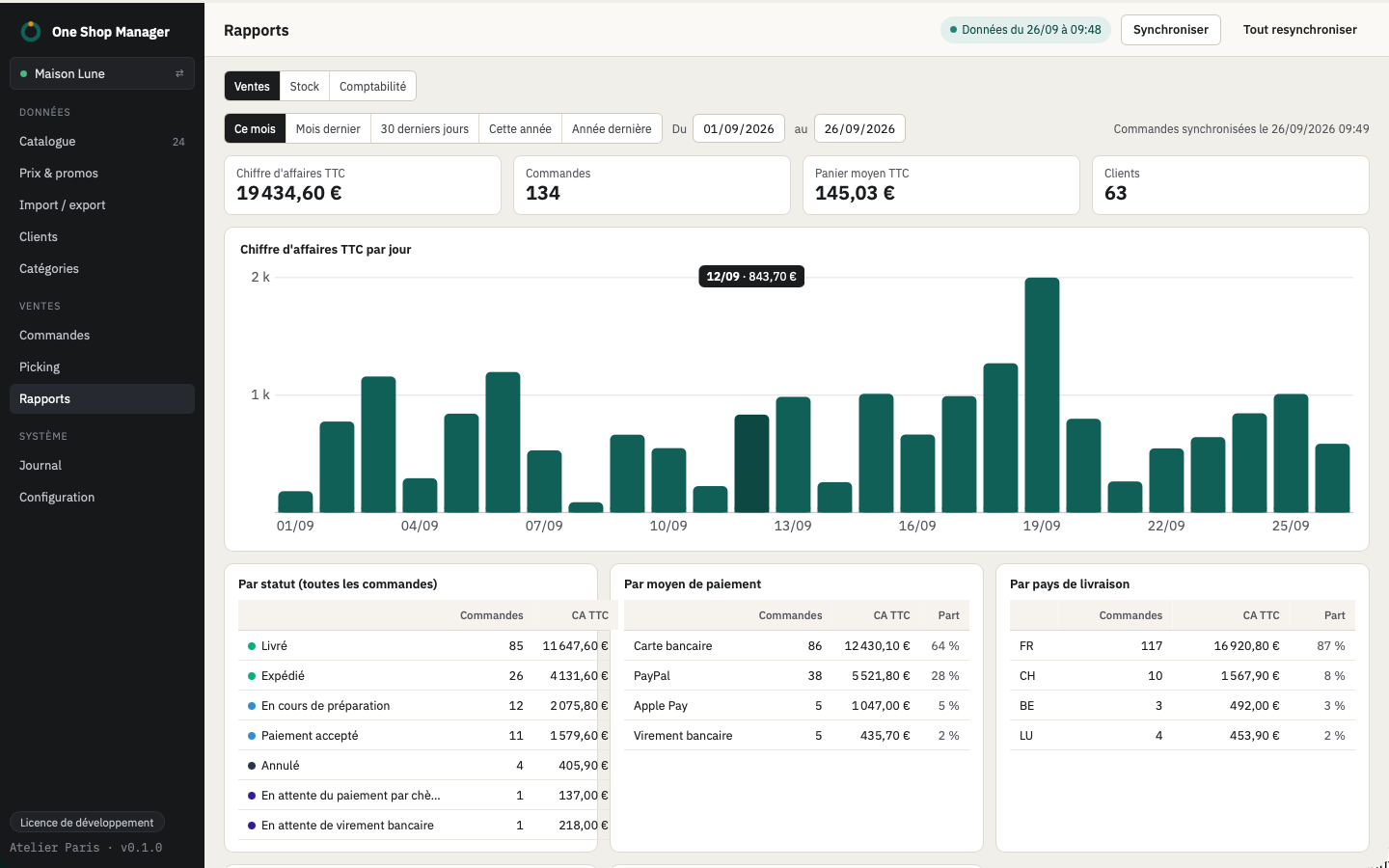
  • Sales and stock reports
  • Accounting exports: FEC, CSV, Sage, EBP, Pennylane
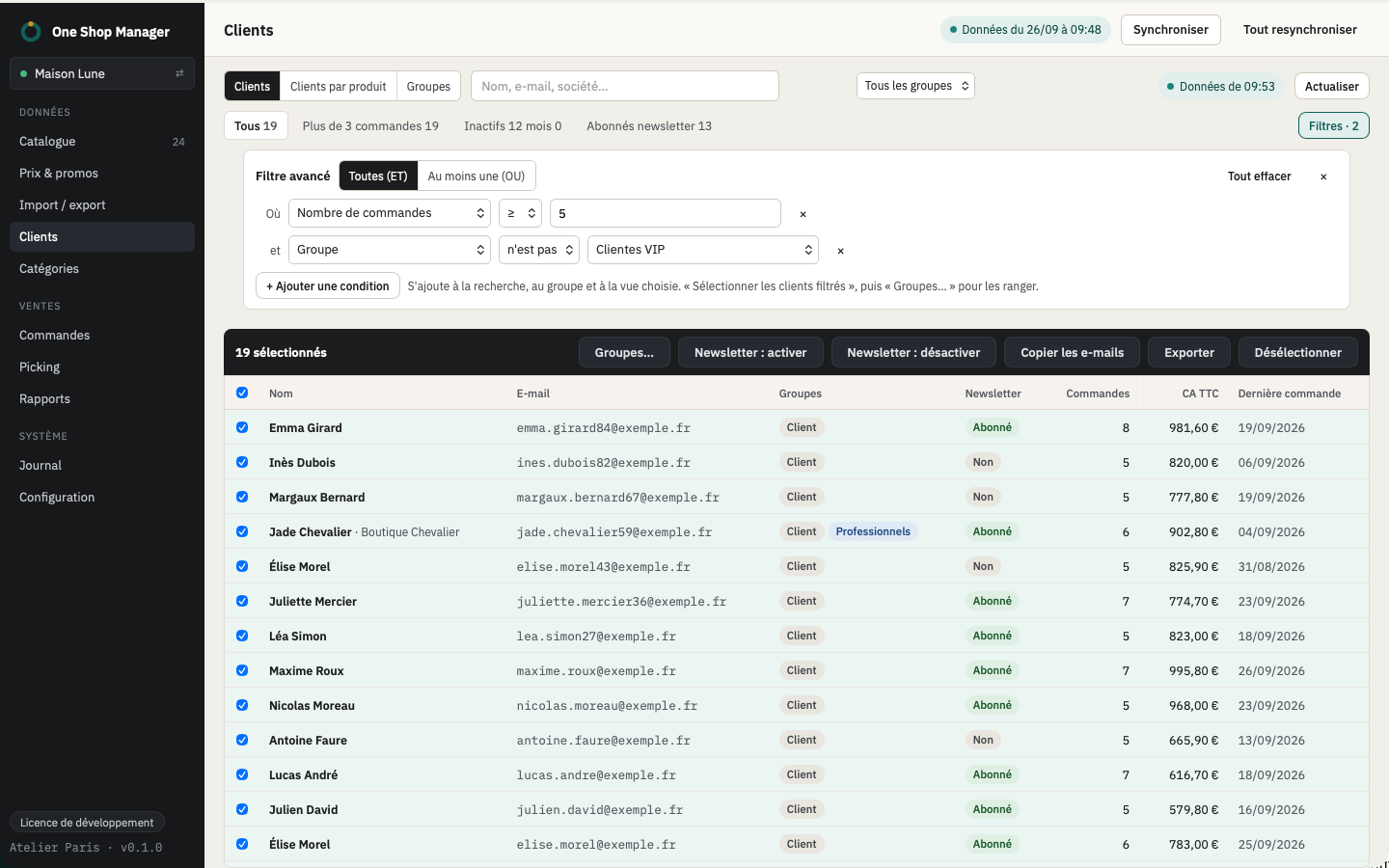
  • Customers: groups, newsletter, customers by product

Import and export Reports and accounting

Import a file
CSV and XLSX import

Every feature, in detail

Catalog
50,000-product gridInstant sort, filter and search, saved columns and views, multi-criteria advanced filter.
Spreadsheet-style editingCopy and paste from Excel, fill down, series increment, paste a list of references or EANs to select.
Product pageAll fields, texts per language, SEO with counters, images, combinations, specific prices.
Texts and SEO in bulkFind/replace, templates such as {name} - {manufacturer}, per language.
Other fields in bulk21 fields: brand, supplier, weight, visibility, availability, condition, tags, etc.
Bulk operations
PriceBy % or by amount, excl. or incl. VAT, rounding to x.99 / x.90 / cent, margin floor on the purchase price.
StockSet or adjust, per product or per combination, never below zero, disable what drops to zero.
Categories and statusAdd, remove, replace, default category; enable or disable, including by category.
Preview before writingRow-by-row before/after table, warnings (negative price, duplicate EAN, change greater than 50%), confirmation above 1,000 rows.
Execution and logIn batches with progress, conflicts if the shop changed, retry of errors, undo of an operation.
AI assistant (MCP)
AI accessMCP connection that stays on your computer, protected by a token, turned on from the AI access menu; works with Claude, Cursor and MCP clients.
ReadingCatalog, stock, orders, customers and reports read on your computer, with no load on the shop.
ProposalsPrices, stock, status, categories, texts and SEO: proposals to approve in the AI assistant screen, with the usual preview, log and undo.
Combinations
Combinations gridStock, price, reference, EAN, weight per combination, cell paste.
GeneratorCartesian product of attributes, reference and EAN template, bulk creation on a selection of products.
In bulkSet or adjust stock, price impact, reference or EAN, default combination, deletion.
Categories
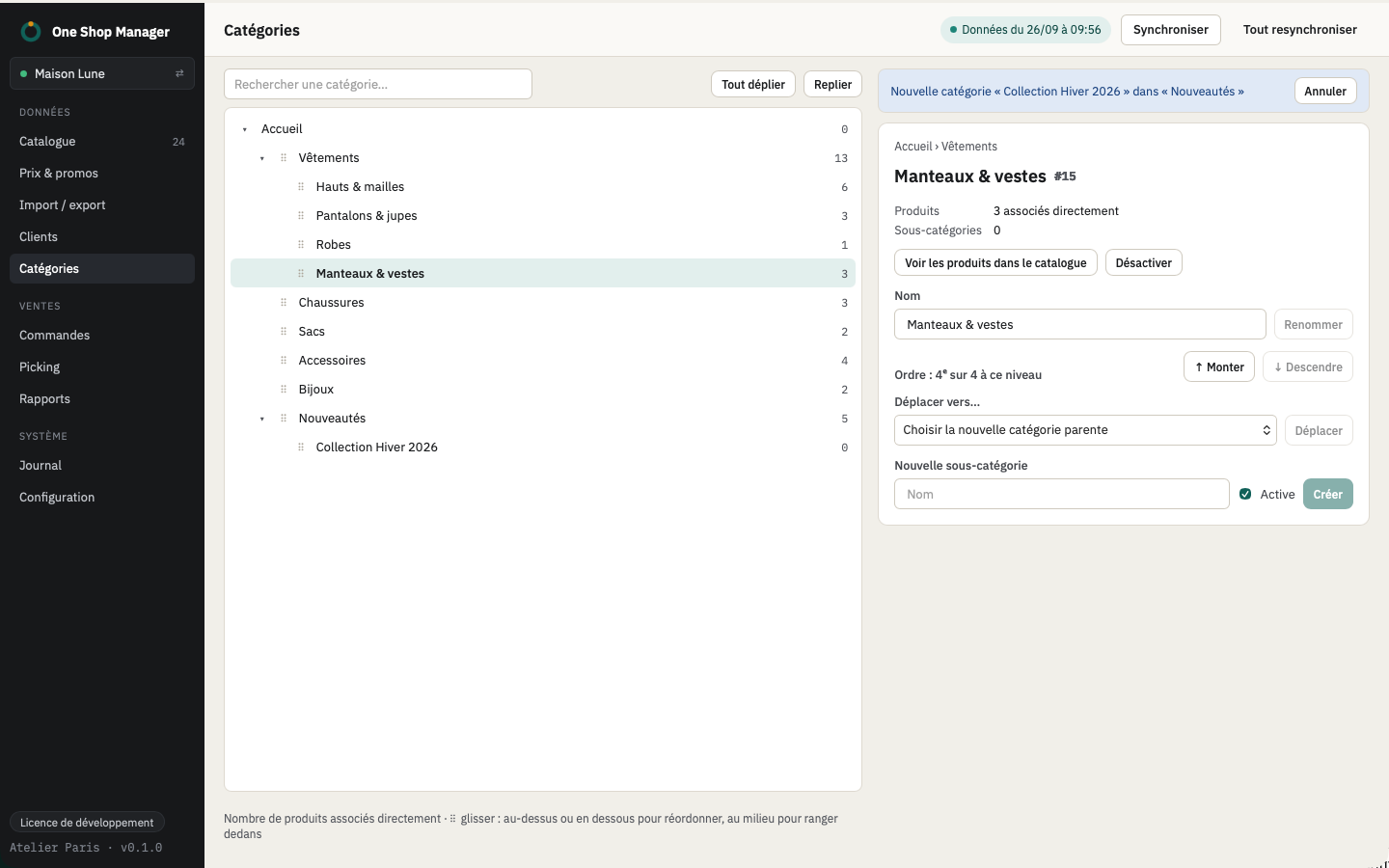
Tree and editingCreate, rename, move, texts and SEO per language, image.
Orders and picking
Order listRolling 90 days plus all unfinished orders, stored locally; "To handle" filters.
Statuses and trackingStatus change on several orders at once, tracking numbers pasted in bulk (order no. ⇥ tracking no.).
PagesFull order page and customer page without leaving the grid.
PickingPicking list, barcode scanner, locks between pickers, progress visible in the grid.
DocumentsDelivery slips, invoices and credit slips printed in batches, or one file per document.
Till
Counter salesEAN13 scan or search, large touch tiles, discounts per line and on the cart, walk-in customer or shop customer.
Taking paymentMultiple payments tied to the shop's payment methods, change given, PrestaShop order created and stock decremented.
ReceiptsPrint or email, invoice on request, duplicate, cancellation by cancellation receipt.
Till journalChained and signed entries, perpetual grand total, automatic daily, monthly and yearly closings, signed archives, copy on the shop.
LockingComputer locked to the till, 4-digit code, computer password for administration and cancellations.
Promotions
CampaignsSpecific prices grouped by label: discount in % or €, dates, group, country, minimum quantity, floor at the purchase price, overlap warning, removal in one click.
Promo codesList, uses, purge of expired codes that were never used.
Customers
Grid and customer pageAdvanced filter, selection of all filtered customers, customer page, customers by product.
Groups and newsletterCustomer groups: create, edit, assign in bulk; newsletter subscription in bulk.
Import and export
CSV / XLSX importColumn mapping profiles, matching by reference or EAN, creation of missing products (disabled), same preview as bulk operations.
ExportCatalog, customers, orders as CSV, as displayed on screen.
Reports
Sales and stockRevenue by period and by product, stock status and value.
AccountingInvoices, credit slips and payments for a period as FEC, CSV, Sage, EBP, Pennylane.
Settings
ShopsMultiple shop profiles, PrestaShop 1.6 to 9, Admin API or Webservice connection.
Module and updatesModule zip included, version check, signed app updates.
BackupLog, views and settings can be exported; log of actions can be exported.

Each area in detail: bulk editing, orders and picking, till, import and export, reports and accounting, AI assistant, multiple shops and offline.

Compatible with your shop, with no middleman

  • PrestaShop 1.6 to 9. One free module on the shop. The app detects what your version allows and hides the rest.
  • macOS 11+ and Windows 10+. Intel and Apple Silicon. Signed, automatic updates.
  • Your data stays with you. Nothing goes through a third-party server. If the shop changed in the meantime, the row comes back as a conflict instead of being overwritten.
  • Your credentials stay locked away. The shop's API keys and passwords are stored in the macOS Keychain or the Windows Credential Manager, never in a file. The AI assistant has no access to them.
  1. Install the appon your Mac or PC.
  2. Install the moduleon your shop. It comes with the app.
  3. Connect and syncTwo minutes later, everything responds locally.

What merchants say about it

Before, changing my product prices took me hours in my back office. With One Shop Manager, I do it in 5 minutes. An incredible time saver, I recommend it!
NNoémi Larocque
Ready-to-wear clothing shop
A considerable time saver when updating my supplier prices. Invaluable day to day!
OOlivie Pariseau
Mobile tech shop
Editing product pages in bulk saves a significant amount of time in my business. On top of that, it avoids data entry errors and makes my operations consistent. Very satisfied with One Shop Manager.
PPhilippine Nadeau
Online pharmacy
−50% at launch

€299 €149excl. VAT, once. Launch price, instead of €299 excl. VAT.

Lifetime license, unlimited shops, up to 3 computers. One year of updates included, then €69/year excl. VAT if you want them: without renewal, you keep the last version you received forever.

Start the 14-day trial

Launch price reserved for the first 100 licenses. Secure payment by Stripe (card or SEPA transfer), automatic invoice and VAT. 30-day money-back guarantee.

More than 3 computers, a network of shops or an agency? Contact us

Included

  • Every feature, PrestaShop 1.6 to 9, Mac and Windows
  • psmanager module
  • One year of updates, then optional at €69/year excl. VAT
  • As many shops as you want, on 3 computers

What you won't find

  • Mandatory subscription: the license never ends
  • Cap on the number of products
  • External server between you and your shop
  • Customer account or tokens to buy again

Against the other tools, we did the math

The price of six months of subscription elsewhere, forever, on all your shops. No account, no tokens, no cap on products.

ToolModelEntry price excl. VATCost over 3 yearsYou save over 3 yearsShopsMac and WindowsPrestaShop 9Account, tokens
One Shop ManagerOne-time payment, optional updates€149, then €299€299, or €437 with updatesBaselineUnlimitedYesYes, and 1.6 to 8None
Store Commander PS9Subscription + tokens€49.99/month€1,800 to €2,160 + tokens€1,360 to €1,860 + the tokensNot specifiedWebPS9 onlyAccount, 10k to 20k products max
Store Commander 1.6 to 8Subscription€9.99 to €79.99/month€1,440 on Solo€1,000 to €1,140, without PS91, multistore costs extraBack office moduleNoMultistore not allowed for agencies
Store Manager, eMagicOneLicense + yearly maintenance$99$280 to $370Comparable price, but for 1 computer, Windows only1 computer per licenseWindows onlyYes3 months of updates, then $89/year
Merlin Backoffice FlexSubscription€20 to €60/month€360 to €1,080Up to €780, depending on the plan1, expandableWindows onlyYesFormer lifetime licenses moved to subscription

Public prices recorded on September 25, 2026, excluding promotions. Cost over 3 years for one shop, savings calculated on the public price of €299, with or without updates at €69/year.

Compared with Store Commander Compared with the PrestaShop back office

Frequently asked questions

Does it replace Store Commander?

One Shop Manager covers bulk operations on the catalog, orders and promotions, including on PrestaShop 9. It is an app installed on your computer, not a module in the back office.

Does my data go through your servers?

No. The app talks directly to your shop. Only the license check contacts our server, and it sends nothing from your catalog. The app also sends anonymous usage statistics (screens opened, types of operations and number of rows, never a product, price or customer), which can be turned off in Settings.

Where are my shop credentials kept?

In your system's secure vault: the macOS Keychain or the Windows Credential Manager. They are never written in plain text on the disk or sent to our servers, and the AI assistant cannot read them. To move to another computer, the exported profile is encrypted with a password you choose.

What happens at the end of the trial?

The number of days left is shown in the app throughout the trial, and you can buy at any time, at the launch price. At the end, the app is limited to the License screen: your data is not touched, and buying reactivates everything exactly where you left off.

I manage several shops, or I have several computers?

A single license is enough. It covers all your shops, agencies and freelancers included, on 3 computers. Changing computers? Release the old one from your customer account.

Can the AI assistant modify my shop?

No, not directly. It reads the data copied to your computer and submits proposals. Nothing is written to the shop until you have opened the proposal, checked the preview and clicked Apply. Like any operation, it can then be undone from the log.

What about my data, with the AI assistant?

AI access is off by default and stays on your computer. Nothing is shared until you have turned it on and linked it to your assistant. After that, only the information needed to answer your questions is sent to it, at the moment you ask them, under the terms of the AI provider you chose. Nothing goes through our servers.

Can I take payments in store?

Yes. Till mode sells at the counter from the shop's stock: barcode scanning, discounts, multiple payments, receipt printed or sent by email. Every sale creates a PrestaShop order and is recorded in a chained and signed till journal. Taking payment requires a connection to the shop.

Native PrestaShop multistore?

Not in this version. One Shop Manager handles separate shops, each with its own installation, not the multistore mode of a single installation.

All questions Install and connect your shop Help

Free 14-day trialMac and Windows