What the assistant can do
- Read: search and filter products (including by the checks "No EAN", "No cost price", "Below cost price"…), look up stock, orders, customers and sales reports.
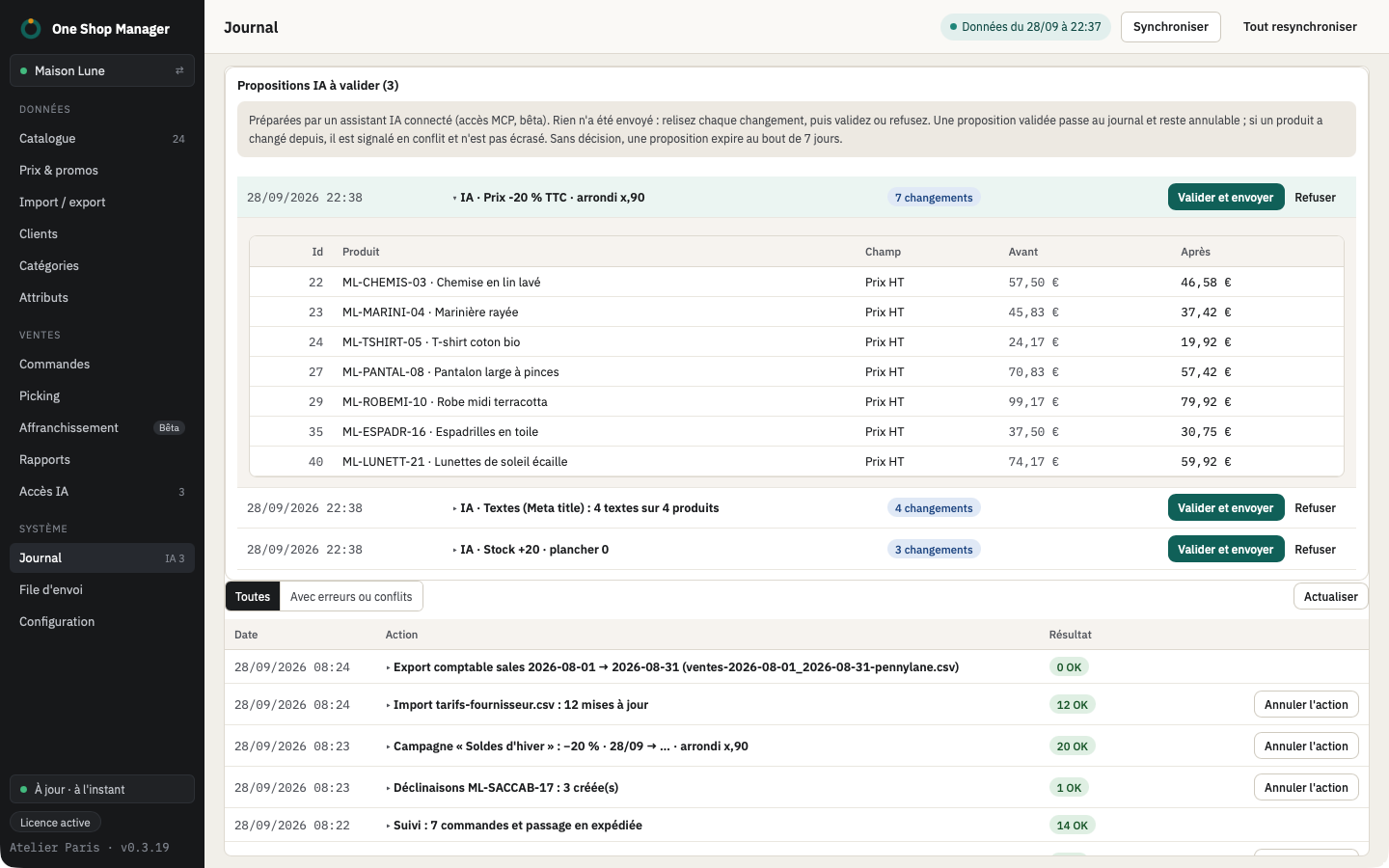
- Propose: prices, stock, status, categories, texts and SEO. Each proposal appears in the AI log screen.
- Not do: write to the shop, read the connection credentials, leave the computer.
How a proposal becomes a change
- The assistant submits a proposal (for example: "+5% on the 120 products below 20% margin").
- You open it in the application: before/after preview line by line, with the usual warnings.
- You apply, adjust or reject it. Once applied, the operation is in the log and can be undone like any other.
Security and privacy
- Access disabled by default, enabled from the AI access menu.
- MCP connection local to the computer, protected by a token.
- The shop's keys and passwords stay in the system keychain; the assistant has no access to it.
- Only the information needed for the question asked is sent to the chosen AI provider, under its terms. Nothing goes through the publisher's servers.
Frequently asked questions
Which AI assistants are compatible?
Claude (desktop application), Cursor and any MCP-compatible client. The application offers one-click installation for Claude Desktop.
Can the AI modify my shop without my consent?
No. It can only submit proposals; nothing is written until you have opened the preview and clicked Apply.