A grid that behaves like a spreadsheet
- Instant sorting, filtering and search across the whole catalog, saved columns and views.
- Advanced multi-criteria filter (and / or) on any column.
- Copy and paste from Excel or Google Sheets, fill down, series increment.
- Paste a list of references or EANs to select the matching products.
- Select cells across several lines, then right-click: "Bulk edit" applies directly to the lines covered.
Bulk operations
| Operation | Detail |
|---|---|
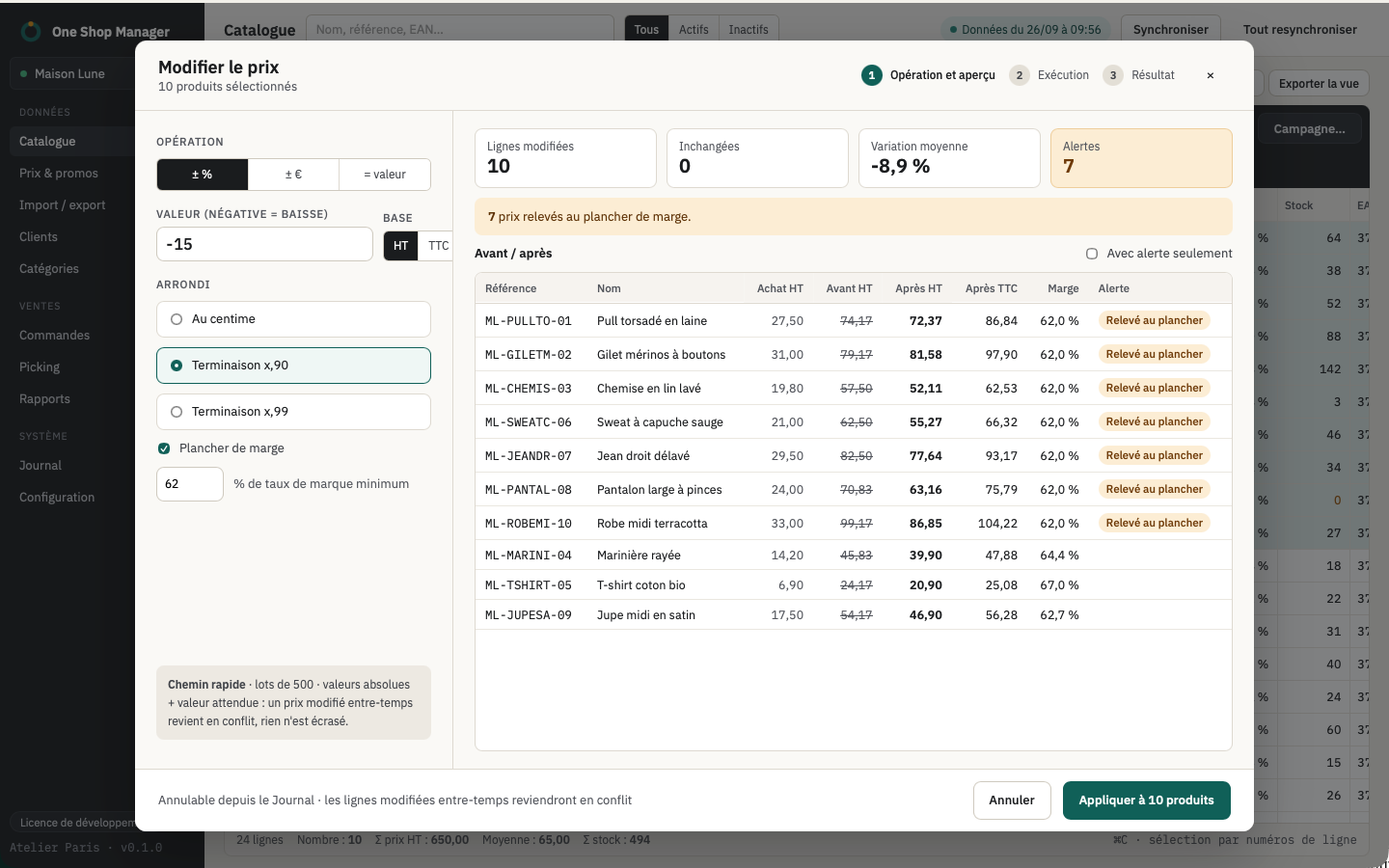
| Prices | By percentage or by amount, excl. VAT or incl. VAT, rounding to x.99, x.90 or to the cent, margin floor on the cost price |
| Stock | Set or adjust, per product or per combination, never below zero, deactivation of whatever drops to zero |
| Categories | Add, remove, replace, change the default category |
| Status | Enable or disable, including by category |
| Texts and SEO | Find/replace, templates such as {name} - {manufacturer}, per language |
| Other fields | 21 fields: brand, supplier, weight, dimensions, visibility, availability, condition, tax, tags… |
| Value of a field | Reference, EAN, weight, cost price… assigned to the whole selection |
| Specific prices | −% or −€ campaign with dates, group, country, minimum quantity |
| Duplicate | Disabled copies, ready to be edited |
| Images | Copy a product's images to other products, add images by URL or file |
Combinations
- Combinations grid: stock, price, reference, EAN and weight per combination, cell pasting.
- Generator: Cartesian product of the attributes (size × color…), reference and EAN templates, bulk creation on a selection of products.
- In bulk: stock set or adjusted, price impact, reference or EAN, default combination, deletion.
Catalog checks
Ready-made views spot what needs fixing, which is then fixed with the same bulk actions:
- Stock at zero, active without stock, inactive with stock.
- Below cost price: each combination is compared to its effective cost.
- No cost price: product, or combination whose effective cost is 0.
- No EAN: product without combinations, or combination without an EAN.
- No photo, no short description, no category (other than home).
- Duplicate references or EANs, combinations included.
The effective cost follows the PrestaShop rule: the combination's own cost price if it is filled in, otherwise the product's.
Safety of changes
- Preview: before/after line by line, with warnings (negative price, duplicate EAN, difference greater than 50%).
- Execution: in batches, visible progress, conflict reported if the shop has changed since the sync.
- Log: retry of errors and undo of a complete operation.
Frequently asked questions
Can you change the price of all of a product's combinations at once?
Yes. Bulk operations apply to the product or to its combinations, and the price impact of combinations can also be edited in bulk.
What happens if someone edits a product in the back office during the operation?
The line concerned comes back as a conflict instead of being overwritten. You then choose whether or not to retry it.
Can a bulk edit be undone?
Yes, from the log: the complete operation is undone and the original values are written back to the shop.
How many products can be edited at once?
There is no cap on the number of products. Above 1,000 lines, the application asks for confirmation.