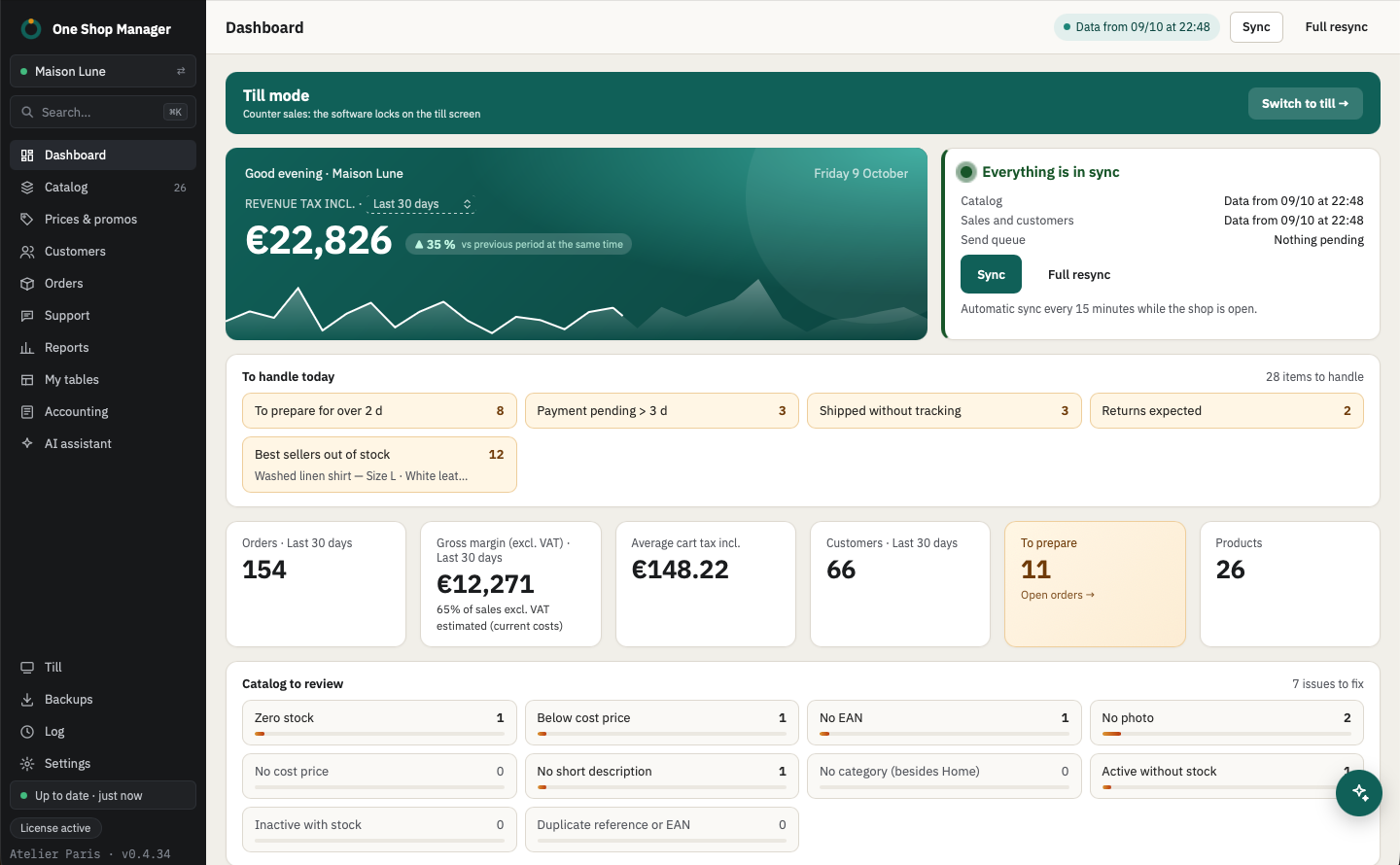
The dashboard
- Revenue incl. tax for today, 7, 30, 90 days or 12 months, compared with the previous period at the same time.
- Orders, average order value incl. tax, customers and gross margin excl. tax (product sales excl. tax minus their cost price).
- To handle today: orders to prepare for over 2 days, payment pending for over 3 days, shipped without tracking, returns expected, best sellers out of stock (among the 50 best-selling products over 30 days). One click opens the list.
- Catalog to review: the number of products per check (stock, cost price, EAN, photos, descriptions, categories, duplicates), one click opens the list.
- The indicators of your own tables, if you add them.
- Sync status, refreshed every 15 minutes while the shop is open.
The reports
| Report | What you read there |
|---|---|
| Sales | Revenue by day or by month, change over the previous period, best and worst sellers, sales by category, country, payment method, status and carrier, best customers, gross margin excl. tax |
| Stock | Units in stock, value at cost price excl. tax and at selling price excl. tax, stockouts; categories or references (gift cards…) left out of the valuation |
| Restock | Products to reorder based on recent sales, days of stock left, restock cost excl. tax, detail by combination |
| Slow movers | Active in-stock products with no sale over the period, or with more days of stock than the chosen threshold |
Every report exports to Excel or goes out by email. From the slow-mover list, you disable the products or launch a promotion campaign, which can be undone from the log.
My tables
You build the tables the reports don't give you, on local data:
- filters written as a sentence ("I want to see…"), one or two groupings, calculations (sum, average, count, minimum, maximum, ratio);
- up to 4 indicators at the top and an optional bar, line or pie chart;
- templates to get started: customers to win back, best customers, dormant products, margin by product, orders by country, revenue by category and by month;
- pinning to the menu, indicators on the dashboard, Excel and CSV export, a definition to send to a colleague;
- cells editable in place (name, reference, price, stock, EAN, active), undoable from the log; a customer table can be put into a group.
Create with AI: you describe the table, for example "my customers from the last 3 months who bought in the Sweaters category", then refine it ("add their country", "group by month"). To build the table, the AI receives the list of available fields, not your data.
With the assistant
You ask, it prepares, you approve:
- "What's my revenue this month, compared with last month?": it reads the sales report and answers with the figures.
- "Which products should I reorder this week?": it reads the restock report and shows you the list.
- "Open my Customers to win back table": it runs the saved table and gives you its rows.
See the AI assistant.
Frequently asked questions
Do the reports slow down the shop?
No. They are computed on the local copy of orders and catalog; the shop is not queried.
How is gross margin calculated?
Product sales excl. tax, shipping excluded, minus their cost price. Lines without a cost price are counted with no cost and flagged.
Are my tables shared between computers?
They are saved on the computer that creates them. To use them elsewhere, export the table definition and import it on the other computer.
Do you need AI to create a table?
No. The editor is enough: fields, filters, groupings and calculations are chosen with the mouse. AI is a shortcut to start from a sentence.
Learn more
- Previous module: customer service.
- Next module: accounting and its exports.