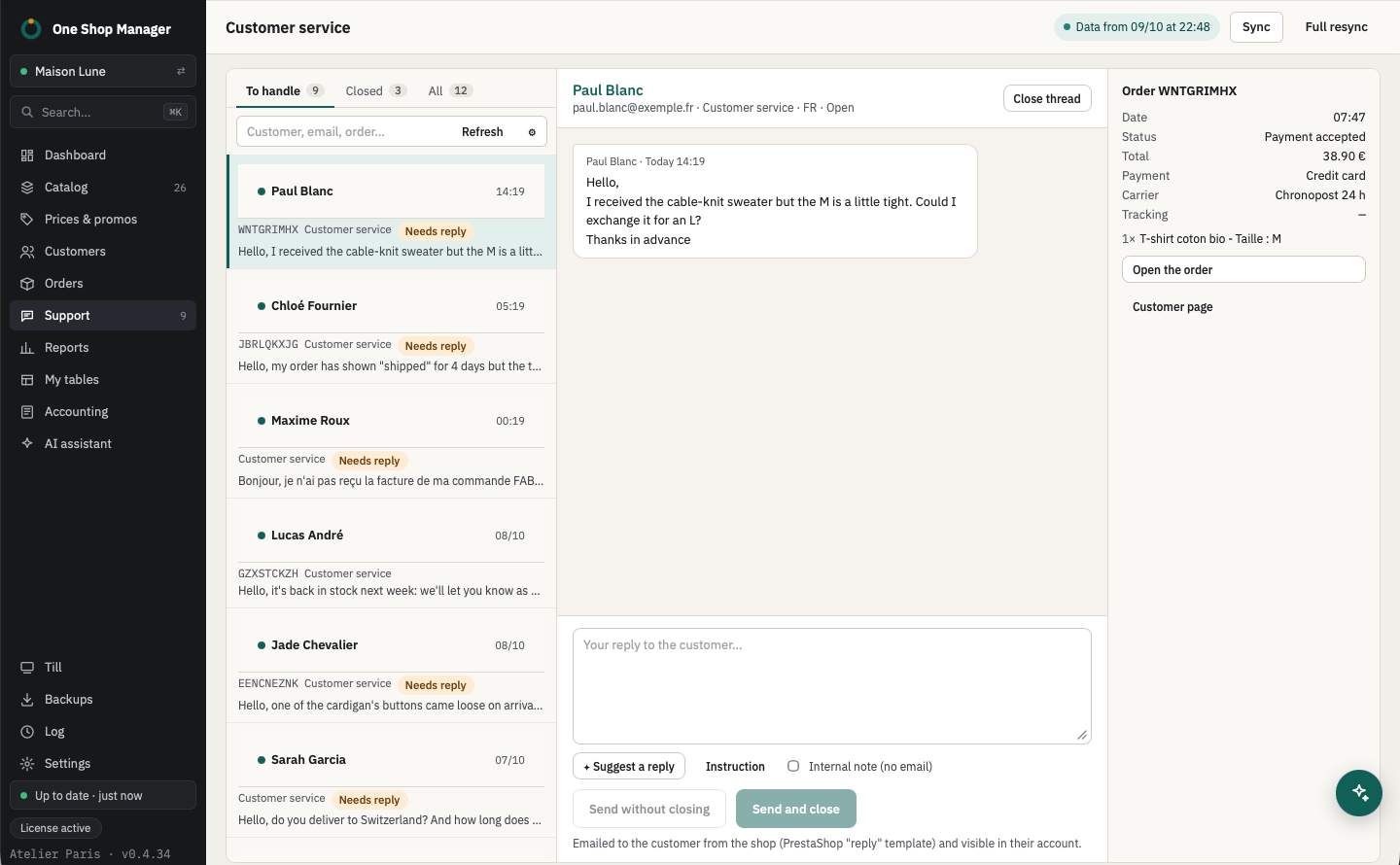
All messages in one tab
- The shop's customer messages, with the time of each message and the attachments.
- "To answer" and "Closed" views, search by customer, email or order.
- Status of each thread: open, pending, closed; you reopen it when needed.
The order and the customer next to the message
- Order linked to the thread: status, payment, carrier, tracking, total, and one click to open it.
- Likely order when the customer doesn't mention one: the last one they placed before their message, flagged "please check".
- Direct access to the customer page (see your customers and their levels).
- From an order, Reply in Support opens the customer's thread; the order's messages also show up during picking.
Reply, or leave a note
| Action | What happens |
|---|---|
| Send and close / Send without closing | Reply sent to the customer by email from the shop (PrestaShop's "reply" template) and visible in their account |
| Internal note | Visible only in PrestaShop and in the software; nothing is sent to the customer |
| Change the status | Open, pending or closed |
A reply draft, in your tone
With Suggest a reply, the AI reads the thread and the order (status, carrier, tracking, items, refunds), then prepares a draft in the customer's language. Missing information becomes "we are checking" rather than something made up. You review it, edit it and send it yourself.
- Settings per shop: formal or informal address, tone (neutral, warm, formal), length (short, medium, detailed), shop style.
- Reply signature and rules to follow (return windows, credit conditions…): the AI promises nothing that isn't in them.
- An instruction for this message only, for example "offer a 10% credit, more formal tone".
The draft goes through the built-in assistant: the thread and order needed for the reply are sent to the AI provider, and the request uses AI credits (or your own API key).
With the assistant
You ask, it prepares, you approve:
- "Where is this customer's order?": it reads the order and its tracking and sums up its status.
- In the thread, the instruction "offer an exchange rather than a refund": it writes the draft, you send it or not.
- "Set order 1042 to Refunded": it files a status change proposal, which you approve in the preview.
See the AI assistant.
Frequently asked questions
Are replies sent from the shop's address?
Yes. The reply is saved in PrestaShop and sent to the customer by the shop, with PrestaShop's "reply" email template; the customer also finds it in their account.
Does the AI send replies on its own?
No. It prepares a draft in the reply box; nothing goes out until you click Send.
Does customer service affect the customer score?
Yes. Support threads beyond one per order take points off the customer score, up to 10 points.
Learn more
- Previous module: orders and picking.
- Next module: the dashboard and reports.